Your Bash Loop Is a Command. Your YAML Is a Recipe.
A bash for-loop runs once. A workflow YAML is a build artifact for an image. Here's what that buys you — and when you should still reach for bash instead.
A bash for-loop is a thing you ran once. A workflow YAML is a thing that travels.
That’s the whole pitch in one sentence. The image at the top of this page was generated by a 14-line file you’ll see in a minute. That same file, sitting in a git repo six months from now, on a different machine, with a different shell and a different shell history — modl run portfolio.yaml and the image comes back. Same model, same LoRA, same seed, same image. A bash script can’t promise that, and that’s before you start thinking about handing the file to someone whose laptop can’t load the model in the first place.
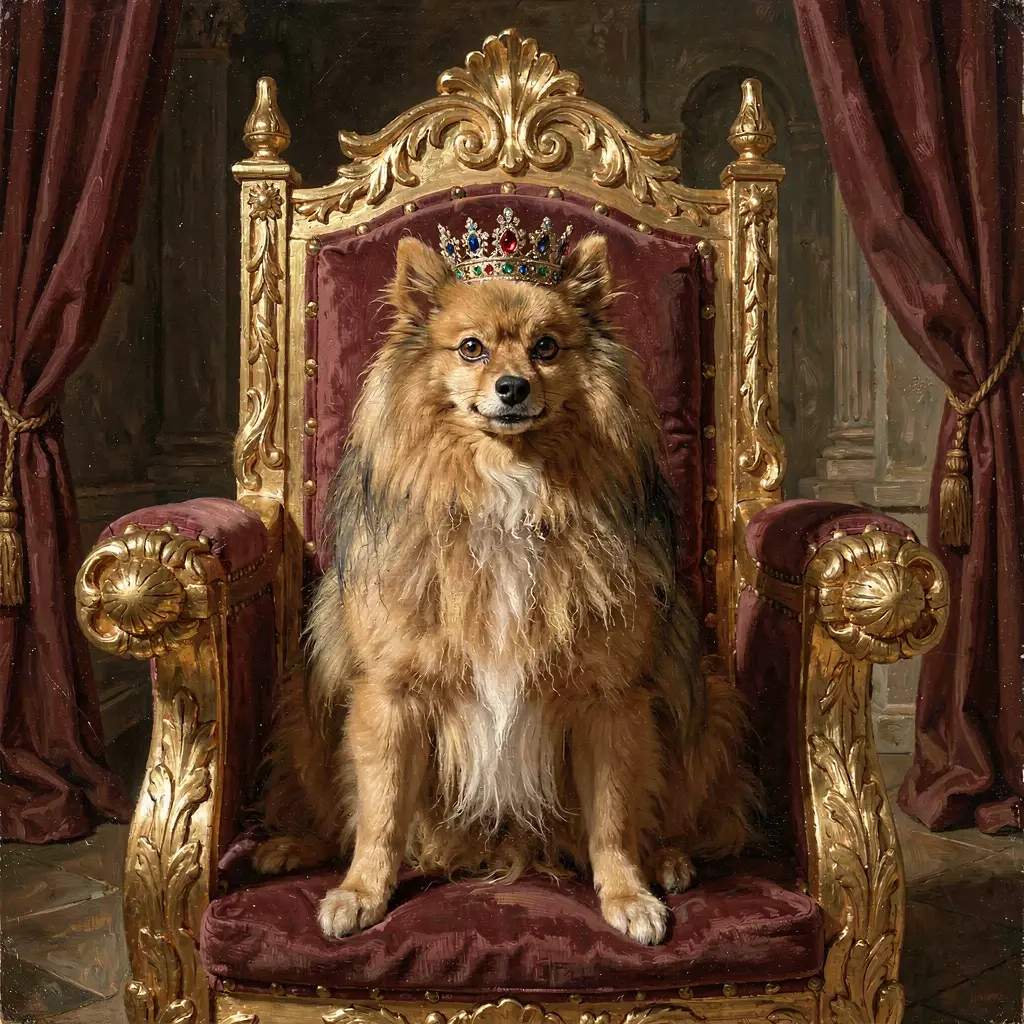
Maxi, my Pomeranian. Klein 9B, 28 steps, seed 99. The image didn't come out like this on the first try — getting here is the other half of the story.
The bash question, head on
Before going further, the obvious objection. Yes, you could write this:
for seed in 42 7 99; do
  for prompt in "throne..." "cherry..." "detective..."; do
    modl generate "$prompt" --lora maxi --seed "$seed" --steps 28
  done
done
That works. It produces nine images. It saves typing. If “save typing” is what you needed, the bash loop is already installed on your machine and this article is over.
The reason to reach for modl run instead is that the YAML is a recipe and the bash loop is a command. Every input that affects a workflow’s output is in the file: model id, LoRA path, prompt, seed, step count, guidance, image dimensions. Commit it to git, diff it, share it, re-run it on a different machine. It’s a build artifact for an image in the same way a Dockerfile is a build artifact for a container. The bash loop is the thing you typed at 11pm on a Tuesday and forgot.
When bash is still the right answer
There are real cases where the bash loop is the correct tool and the YAML file is overkill. One-off exploration where you’re going to throw away every output. Prompts you already know you’ll never re-run. Iterating on a single prompt at the shell until it feels right. Playing. The YAML shape starts paying off the moment an output is worth keeping — worth coming back to, sharing, re-running, or handing to a machine that isn’t yours. If the answer to “will I want this image back in three months” is “no,” don’t write a YAML file. Run the loop, keep what you like, move on.
The rest of this article is about the case where the answer is yes.
The file
The model I’m using is flux2-klein-9b — the bigger of the two Klein image models I have trained LoRAs on (the smaller one is flux2-klein-4b, half the VRAM, about five times faster, noticeably weaker at preserving character likeness). Here’s the minimal YAML:
name: maxi-throne
model: flux2-klein-9b
lora: ~/modl/loras/maxi-klein-9b.safetensors

steps:
  - id: throne
    generate: "maxi pomeranian sitting on a golden throne wearing royal robes, oil painting style, dramatic lighting"
    seed: 42
    steps: 28
    guidance: 3.5
Save it as maxi.yaml, run it:
One image, ~2.5 minutes wall-clock on a 4090 (most of which is loading Klein 9B and the LoRA into VRAM). Subsequent images in the same run skip that load and average about 70 seconds each — the cold-start amortizes across however many images you queue up, so the more you batch, the cheaper each image gets.
What’s important about this file isn’t that it’s short. It’s that everything that affects the output is in it. The model id is declared. The LoRA is declared by path. The seed is pinned. The step count, guidance, and dimensions are all explicit (or default to values modl knows for this model). Commit the file, push it to a repo, and the recipe travels with you. Next year, on a fresh machine with the same model and LoRA installed, modl run maxi.yaml rebuilds the image. The image is a function of the YAML and the installed weights — nothing else.
Now add seeds. Same prompt, multiple seeds, one image each:
steps:
  - id: throne
    generate: "maxi pomeranian sitting on a golden throne wearing royal robes, oil painting style, dramatic lighting"
    seeds: [42, 7, 99]
    steps: 28
    guidance: 3.5
Three images. Reproducible by seed. The seed list is now part of the recipe — six months later you check out the file and you get the same three images, in the same order, with the same numbering. Not “three new variations of the prompt,” the same three. Including, as it turns out, the same three mistakes:
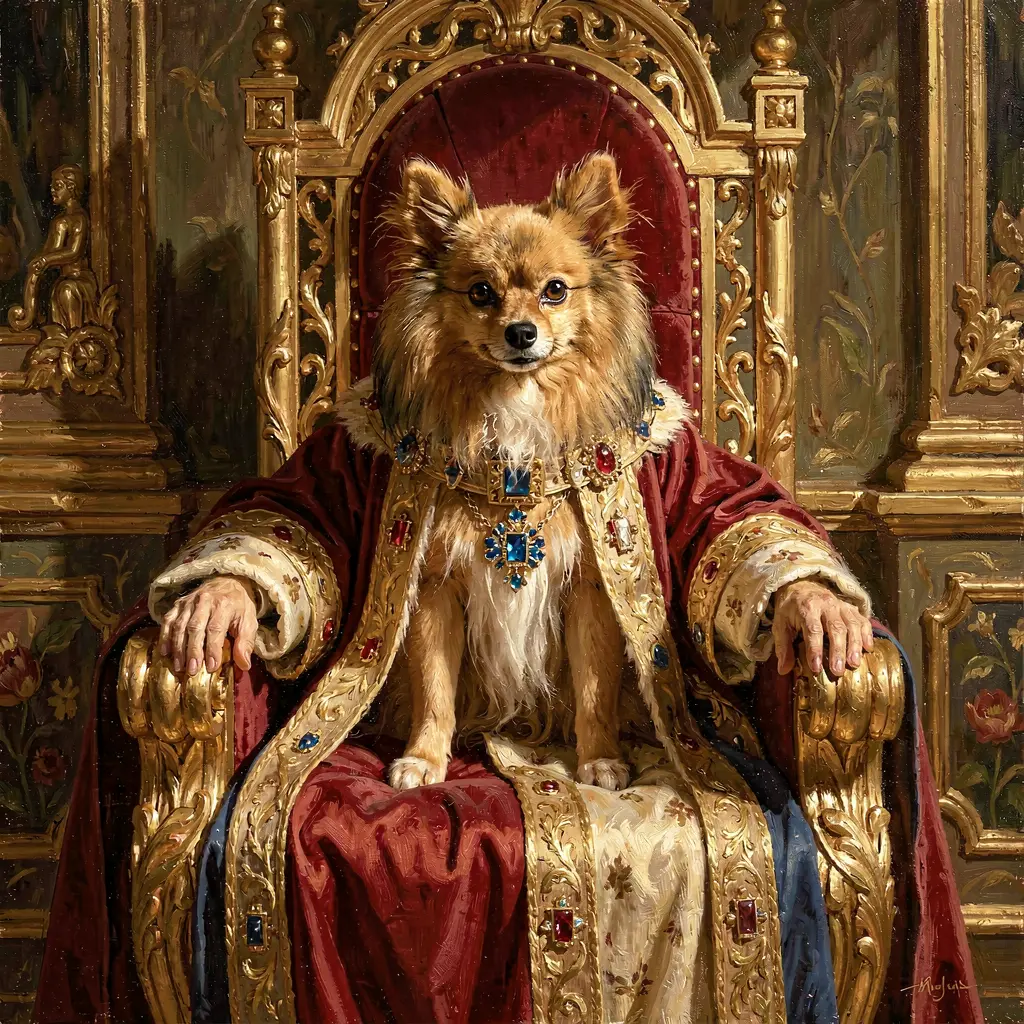
seed 42
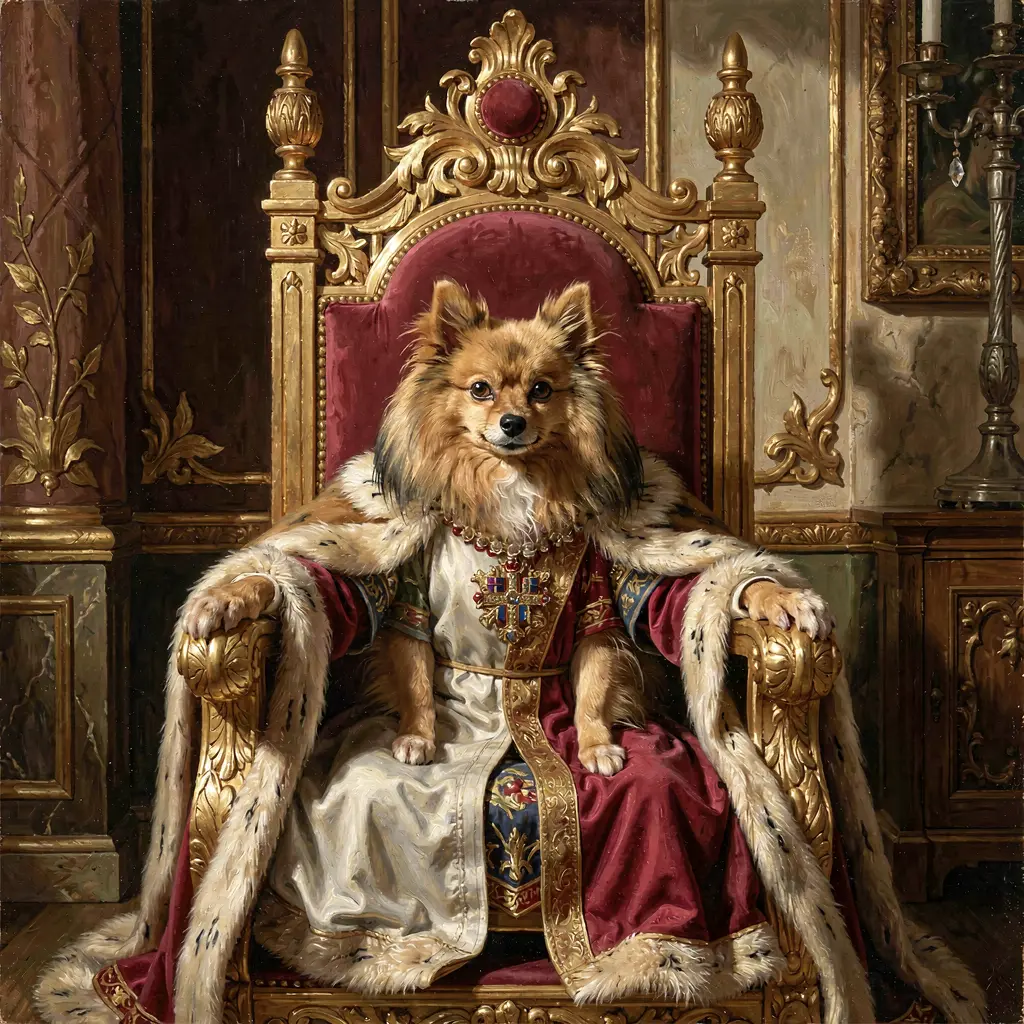
seed 7
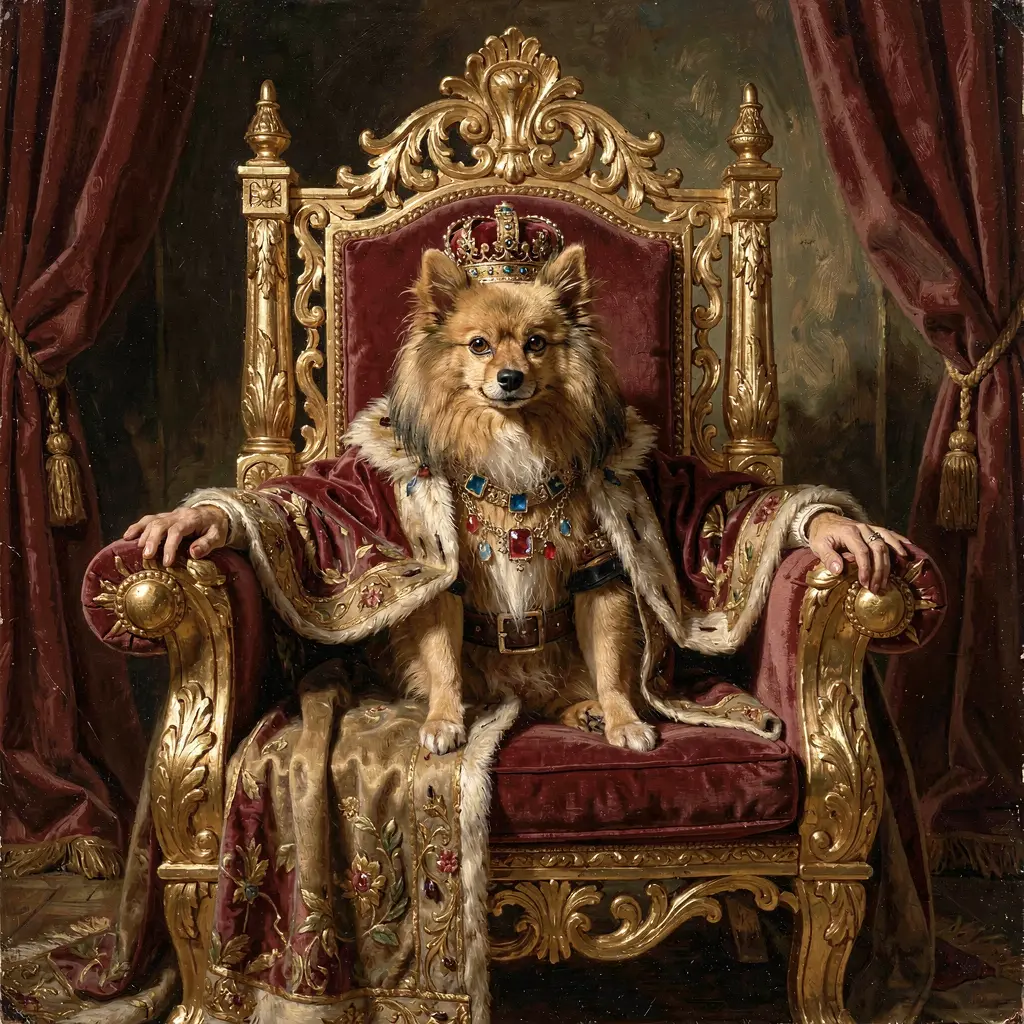
seed 99
That’s what happened. Look at the armrests. Those are human hands. The face is Pomeranian, the body is something else, and I’ll come back to why in a minute. For now, the point is that these three broken images are reproducibly broken — same seed, same command, same hands, every time. That’s both the good and bad news of pinning a recipe: you get back exactly what you put in, including the mistakes. The fix is the next thing the file is going to buy you, but first I’ll finish showing you the file that produced them.
Reuse the same seed list across every scene in your file. Not because the seeds “mean” anything across prompts — they don’t, a seed just determines the initial noise tensor and its character is specific to the prompt it’s attached to — but because matching seed counts per scene keeps the output grid regular. Three scenes × three seeds = nine images in a predictable shape, easy to scroll through and curate. Ragged grids are harder to triage.
The actual run
Three scenes, three seeds each, nine images. This is the file I ran for this guide:
name: maxi-portfolio
model: flux2-klein-9b
lora: ~/modl/loras/maxi-klein-9b.safetensors

defaults:
  width: 1024
  height: 1024
  steps: 28
  guidance: 3.5

steps:
  - id: throne
    generate: "oil painting of maxi pomeranian sitting upright on a golden throne, full pomeranian body with four paws, small jeweled crown on his head, dramatic lighting, royal palace background"
    seeds: [42, 7, 99]

  - id: cherry-blossoms
    generate: "maxi pomeranian in a kyoto garden surrounded by cherry blossoms, soft afternoon light, photorealistic"
    seeds: [42, 7, 99]

  - id: detective
    generate: "maxi pomeranian as a 1940s noir detective wearing a trench coat and fedora, smoky bar background, black and white film grain"
    seeds: [42, 7, 99]
One command, about 11 minutes 30 seconds, nine PNGs in ~/.modl/outputs/2026-04-15/. The model and LoRA load once at the start; the rest is pure inference. The defaults: block exists so I’m not retyping steps: 28 and guidance: 3.5 on every step — and so that if I ever bump the step count, I bump it once and the recipe stays consistent.
That’s the final version of the file. I got there in two runs: the first one produced the throne images with the hand problem, I fixed the prompt, I re-ran. The fix is the next section.
The throne winner (seed 99) is at the top of this article. Here are the other two keepers:
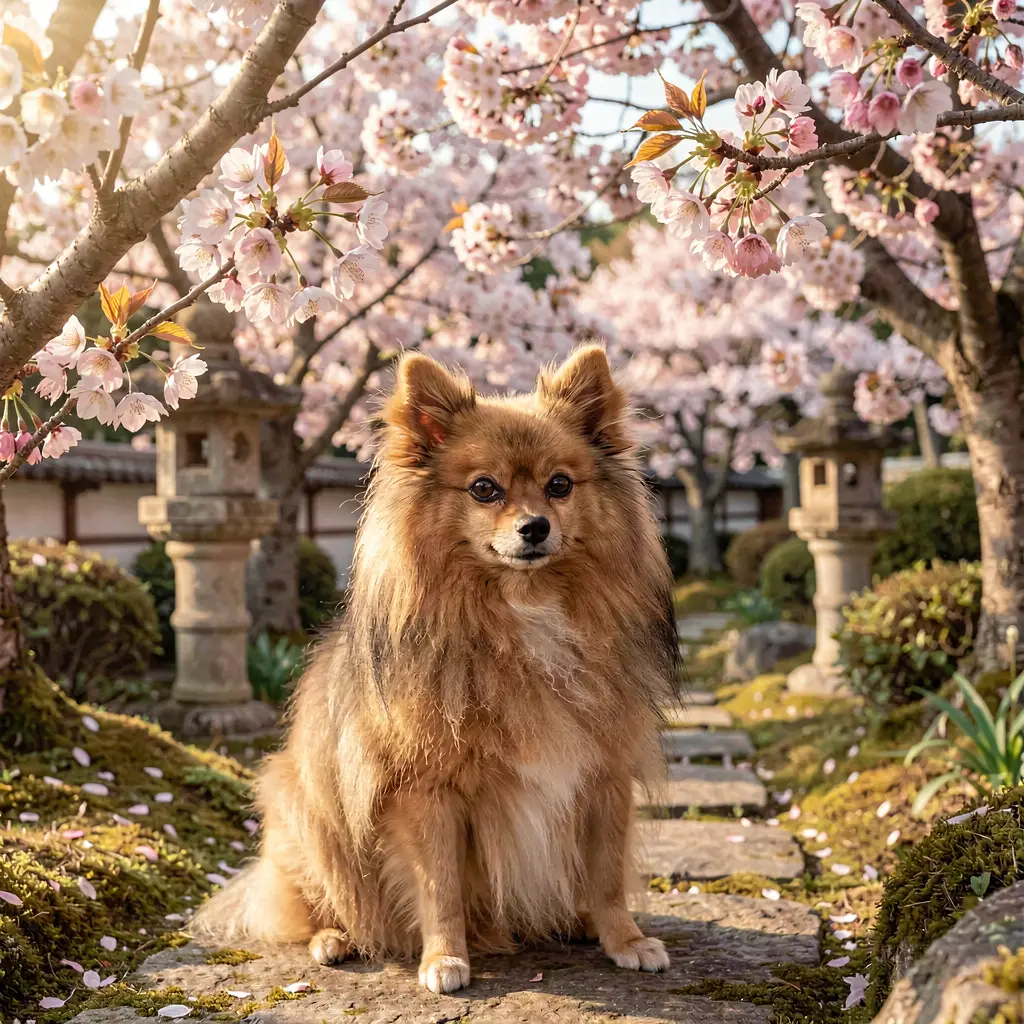
cherry-blossoms — seed 99
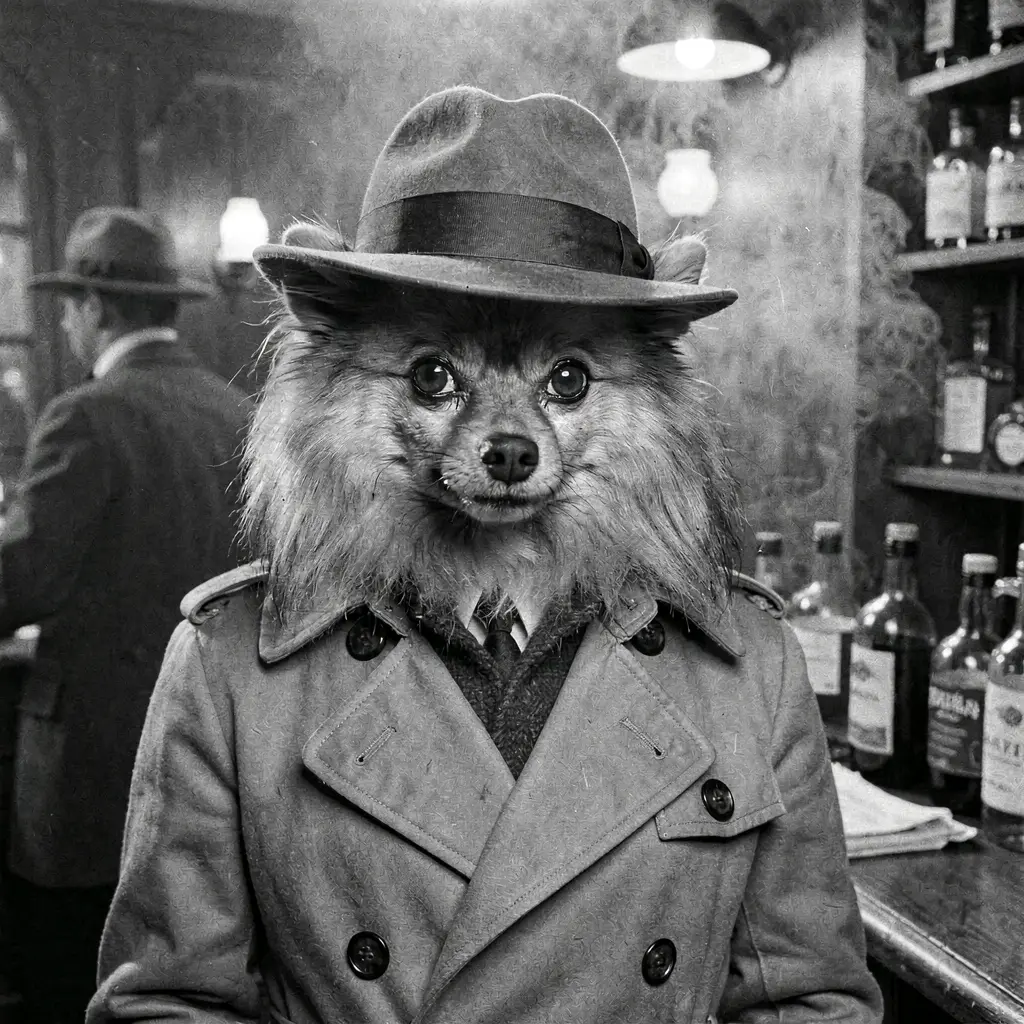
detective — seed 7
The detective is my favorite of the run. I write throne/99, cherry-blossoms/99, detective/7 in a notes file next to the YAML, and I’m done. The recipe and the curation list together are about 30 lines of text that produce three reproducible images on any machine that has the model and the LoRA. That’s the whole asset.
While the run was still executing, I had modl serve open in another tab at http://localhost:7878. Every workflow run shows up in the gallery grouped by run — modl tags each job with workflow, workflow_run, and workflow_step labels, so filtering to “everything from maxi-portfolio today” gives you all nine images organized by step. That grouping only works because the workflow is a first-class object in the system; you can’t bolt it onto a for loop.
When a step misfires: the fix is a diff, not a shell command
Back to those hands. The diagnosis is easy once you stare at the image for thirty seconds: my original prompt said “wearing royal robes,” and robes imply a human torso underneath. The model was filling in the body shape implied by the clothing, because that’s what it was trained on — humans in robes. The LoRA was fighting the prompt and losing. Face: Pomeranian. Everything below the neck: whatever fits under a robe.
The fix was a one-line prompt edit. Drop “wearing royal robes.” Add “full pomeranian body with four paws” as an explicit anatomy anchor, so the model has something concrete to render instead of guessing. Move the crown onto the head where the regal cue is supposed to live. Here’s the diff:
  - id: throne
-   generate: "maxi pomeranian sitting on a golden throne wearing royal robes, oil painting style, dramatic lighting, ornate background"
+   generate: "oil painting of maxi pomeranian sitting upright on a golden throne, full pomeranian body with four paws, small jeweled crown on his head, dramatic lighting, royal palace background"
    seeds: [42, 7, 99]
I changed one line, ran modl run maxi-portfolio.yaml --dry-run to confirm the YAML still validates, then modl run maxi-portfolio.yaml. Same three seeds, new prompt, three new throne images — all with four paws, no human hands. The rest of the workflow (cherry-blossoms, detective) didn’t have to re-run, and didn’t, because nothing in their lines of the file changed.
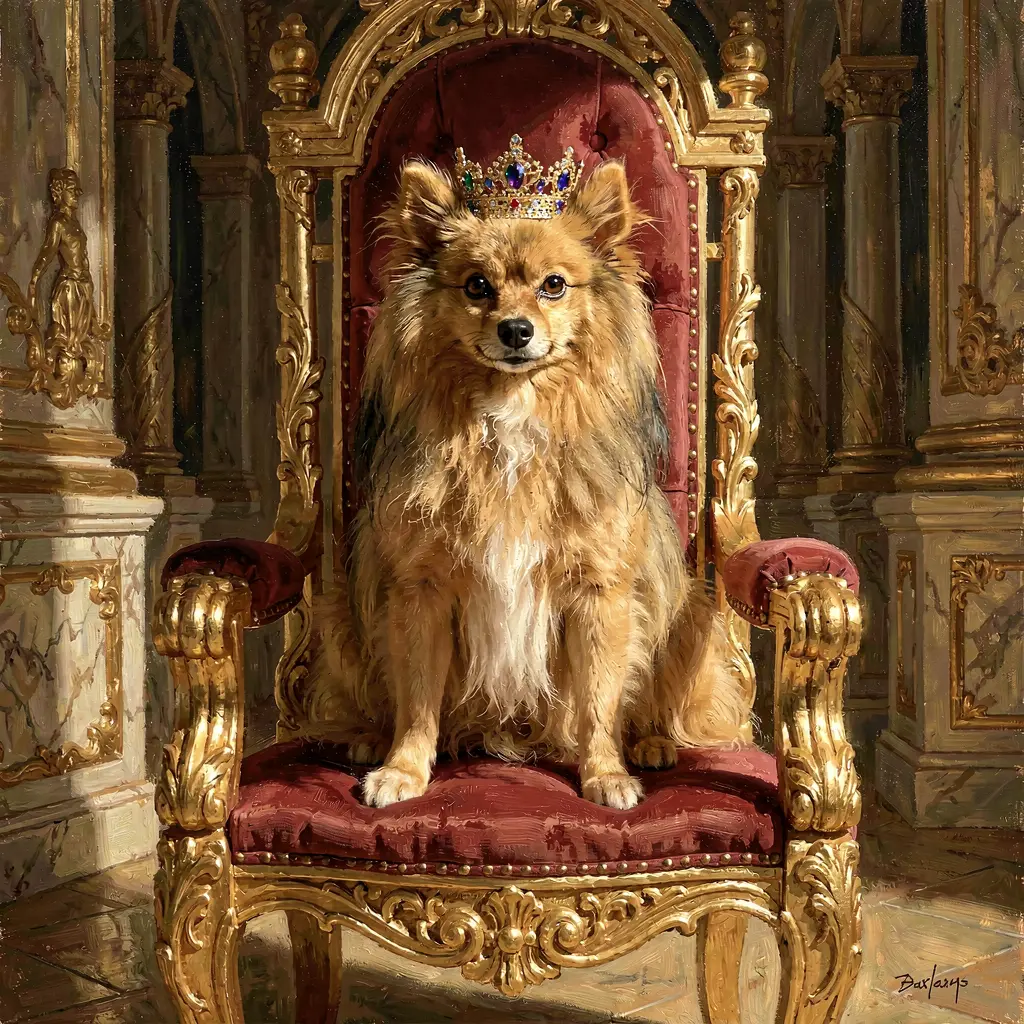
seed 42
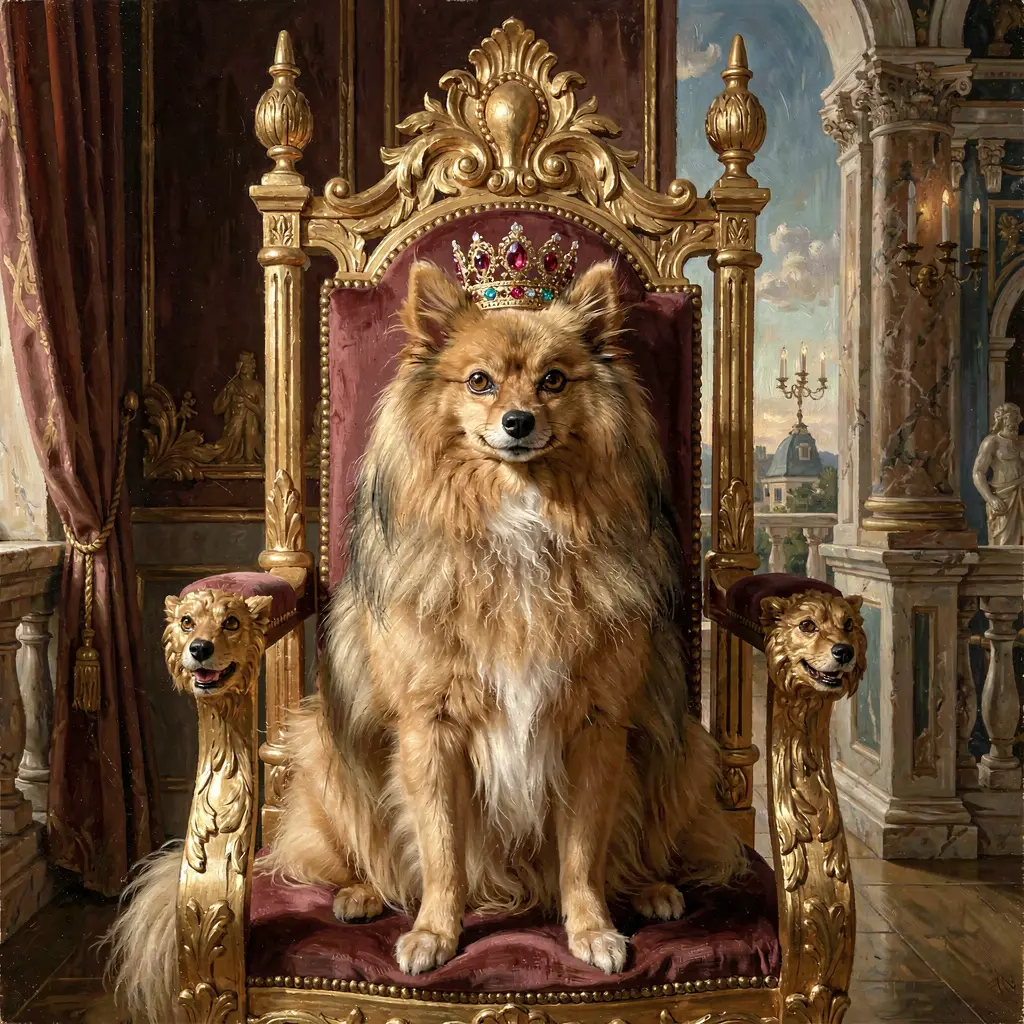
seed 7
seed 99
This is the second half of the reproducibility thesis. Bash would have given you the same broken throne images, and your fix would have been “type the prompt differently next time” — a fix that lives in your head. In a YAML file, the fix is a committed diff. Six months from now, if you’re generating another animal in another regal outfit and you hit the same failure mode, you git log the workflow file, see the old commit that said ”// drop robes, anchor anatomy — the robes made it grow hands,” and you save yourself the debugging session. The file accumulates institutional knowledge about your own model.
So far the file has bought you reproducibility — same recipe, same image, any time — and iterability — the fix is a diff you can re-run. The next thing it buys you is portability: same recipe, any machine. That’s where the file format starts doing things bash genuinely cannot.
Mixing models in one file
You can override the model per step. This file mixes Klein 4B and Klein 9B with their respective LoRAs:
name: maxi-mixed
model: flux2-klein-4b
lora: ~/modl/loras/maxi-klein-4b.safetensors

steps:
  - id: beach-4b
    generate: "maxi pomeranian on a tropical beach at sunset"
    seed: 42

  - id: forest-9b
    generate: "maxi pomeranian in a redwood forest, dappled light"
    model: flux2-klein-9b
    lora: ~/modl/loras/maxi-klein-9b.safetensors
    seed: 42

  - id: city-4b
    generate: "maxi pomeranian on a tokyo street at night, neon"
    seed: 7

  - id: meadow-9b
    generate: "maxi pomeranian in an alpine meadow"
    model: flux2-klein-9b
    lora: ~/modl/loras/maxi-klein-9b.safetensors
    seed: 7
Two 4B steps, two 9B steps, interleaved. If you ran them in the order you wrote them, you’d reload the base model three times. Loading Klein 9B from disk takes 30–90 seconds. That’s three minutes of pure GPU idle time, on every run, forever.
Setting a per-step model: override auto-disables the workflow-level LoRA — the LoRA almost certainly belongs to a different base model. If you want a LoRA on the override step (a 9B-trained version of the same character), set lora: explicitly, like in the example above.
modl run runs a small scheduler before the GPU touches anything: it reorders independent steps to minimize model switches, while preserving any data dependencies between them. Here’s the dry-run output for the file above:
3 → 1 (saved 2) — real output, not a mock. The two 4B steps run together, then both 9B steps. The (yaml #N) annotations show what got moved.
This is load-bearing for the portability claim. A bash script you wrote against your own GPU is hand-tuned for your own GPU — you knew to group your Klein 4B calls together because you remembered the cold-start cost. Send that script to someone with a different GPU, or push it to a CI runner, or hand it to an agent that doesn’t know about model load times, and it falls apart. The YAML doesn’t have to be hand-tuned. The scheduler runs on whatever machine the file lands on, and it tunes the file for that machine.
The recipe is portable because it’s also self-optimizing.
Model shootout: same scene, every model
The previous example mixes models for different pipeline stages — Klein 4B for drafts, Klein 9B for finals. There’s a second multi-model pattern that’s even more common: comparing models head-to-head. Same prompt, same seed, three models, pick the winner per scene.
This is the “which model is best for my use case” question, and the only honest way to answer it is to run them all. Here’s a workflow that generates five scenes of an Atlantis kids book across three models:
name: atlantis-kids-book
model: z-image-turbo

defaults:
  width: 1024
  height: 1024
  steps: 8
  guidance: 3.5

steps:
  # --- Scene 1: The Grand Gates ---
  - id: gates-zimage
    generate: "the grand golden gates of Atlantis rising from the ocean floor, shimmering turquoise water, colorful coral and friendly fish swimming around marble columns, soft magical glow, children's book illustration style, whimsical and enchanting"
    seed: 101

  - id: gates-ernie
    model: ernie-image-turbo
    generate: "the grand golden gates of Atlantis rising from the ocean floor, shimmering turquoise water, colorful coral and friendly fish swimming around marble columns, soft magical glow, children's book illustration style, whimsical and enchanting"
    seed: 101

  - id: gates-klein
    model: flux2-klein-9b
    generate: "the grand golden gates of Atlantis rising from the ocean floor, shimmering turquoise water, colorful coral and friendly fish swimming around marble columns, soft magical glow, children's book illustration style, whimsical and enchanting"
    seed: 101

  # ... 4 more scenes, same pattern: one step per model
Fifteen steps. Five scenes × three models. Every prompt copy-pasted three times with only the model: and id: fields changing. The YAML is 90 lines of mostly duplication, and adding a fourth model means adding five more copy-pasted steps.
It works. The scheduler groups them efficiently:
14 → 2 (saved 12). All five z-image-turbo steps run first, then all five ernie-image-turbo, then all five flux2-klein-9b. Two model reloads instead of fourteen. The scheduler turns a naively-ordered 15-step workflow into three warm batches without you touching the execution order.
But the file itself is painful. Every prompt appears three times. Change a word in the Atlantis gates prompt and you have to change it in three places. Miss one and your “same prompt, different model” comparison is silently broken. This is the one place where the bash loop is genuinely less error-prone — for model in ...; do modl generate "$prompt" --base "$model"; done has the prompt in one place.
A top-level models: list that auto-expands every step across all listed models is on the roadmap. The workflow above would collapse to five steps instead of fifteen — one per scene, with the model fan-out handled by the runner. Until then, the per-step model: override is the way to do cross-model comparison.
The comparison output is worth the verbosity. Fifteen images land in ~/.modl/outputs/<today>/, tagged by step id — gates-zimage, gates-ernie, gates-klein. Open modl serve, sort by workflow step, and you’re looking at a 5×3 grid of the same scenes rendered by three different architectures. That’s how you pick a model for a project: not by reading benchmarks, but by looking at your actual prompts on your actual use case.
Validate before you spend GPU time
modl run --dry-run parses the file, checks every model and LoRA exists locally, expands the seed lists, runs the scheduler, and tells you what would happen — without touching the GPU. It catches typos, missing LoRAs, wrong model ids, ambiguous seed/count combinations, and capability mismatches (e.g. generate: on an edit-only model).
Add --json for parseable output:
{
  "schema_version": 1,
  "valid": true,
  "workflow": { "name": "maxi-mixed", "model": "flux2-klein-4b", "lora": "maxi-klein-4b" },
  "total_planned_artifacts": 4,
  "execution": {
    "mode": "optimized",
    "order": ["beach-4b", "city-4b", "forest-9b", "meadow-9b"],
    "model_switches": 1,
    "switches_in_yaml_order": 3,
    "switches_saved": 2
  }
}
Exit code is always 0 in JSON mode — validity is signalled by the "valid" field. The schema_version only bumps on breaking changes.
This is the part bash can’t do at all. A shell script is a black box: the only way to know if it works is to run it, and running it spends GPU. A YAML workflow has a static contract, and that contract is verifiable in milliseconds. An AI agent can write a workflow file, validate it for free, and only spend GPU when the plan checks out. A human can do the same — modl run portfolio.yaml --dry-run && modl run portfolio.yaml is a one-liner that refuses to start the run if anything’s broken.
Why this is a file format, not a flag
There’s a reason modl run takes a YAML file and not fifteen flags on modl generate. The unit of work has to be something that can leave the machine that typed it. scp it to a workstation. git clone it on a CI runner. Hand it to an agent in a tool-use loop. Push it to a GPU your laptop couldn’t host — Klein 9B doesn’t fit on a MacBook Air, but a YAML file fits anywhere. Flags don’t travel; files do.
If you don’t have a LoRA yet, start with Train a Character LoRA. If you want an AI agent to write workflow YAML for you, see Why modl Works with AI Agents. If you trained a LoRA last week and you’re sitting at the terminal retyping prompts: stop, write the YAML, commit it, and never lose the recipe again.