Train a Character LoRA — From 24 Photos to Infinite Scenes
I trained my Pomeranian on 5 models in one day. Real benchmarks, real failures, and the one setting that fixed Z-Image.
TL;DR
Train a LoRA from 24 phone photos in one command. Works for people, pets, and products. Klein 4B gives the best quality/speed balance (85 min on a 4090). Use --class-word with the specific breed or type — “pomeranian” not “dog”. If using Z-Image, the prodigy optimizer is essential — adamw doesn’t converge. Full benchmarks and failure analysis below.
The goal
I wanted to train my Pomeranian across every viable model in a single day — same 24 photos, same trigger word, same GPU — and find out which combination actually produces the best character LoRA. Along the way, 8 of my training runs failed. Every failure taught me something.
This guide walks through the method, the results, and the mistakes. If you just want the settings, skip to the cheat sheet. If you want to understand why those settings work, read on.
You’ll need an NVIDIA GPU with 10+ GB VRAM (16-24 GB recommended), 15-30 photos of your subject, and modl v0.2.8+ installed (curl -fsSL https://modl.run/install.sh | sh). Under the hood, modl wraps ai-toolkit for training — if you prefer to use ai-toolkit directly, all the settings and findings here still apply.
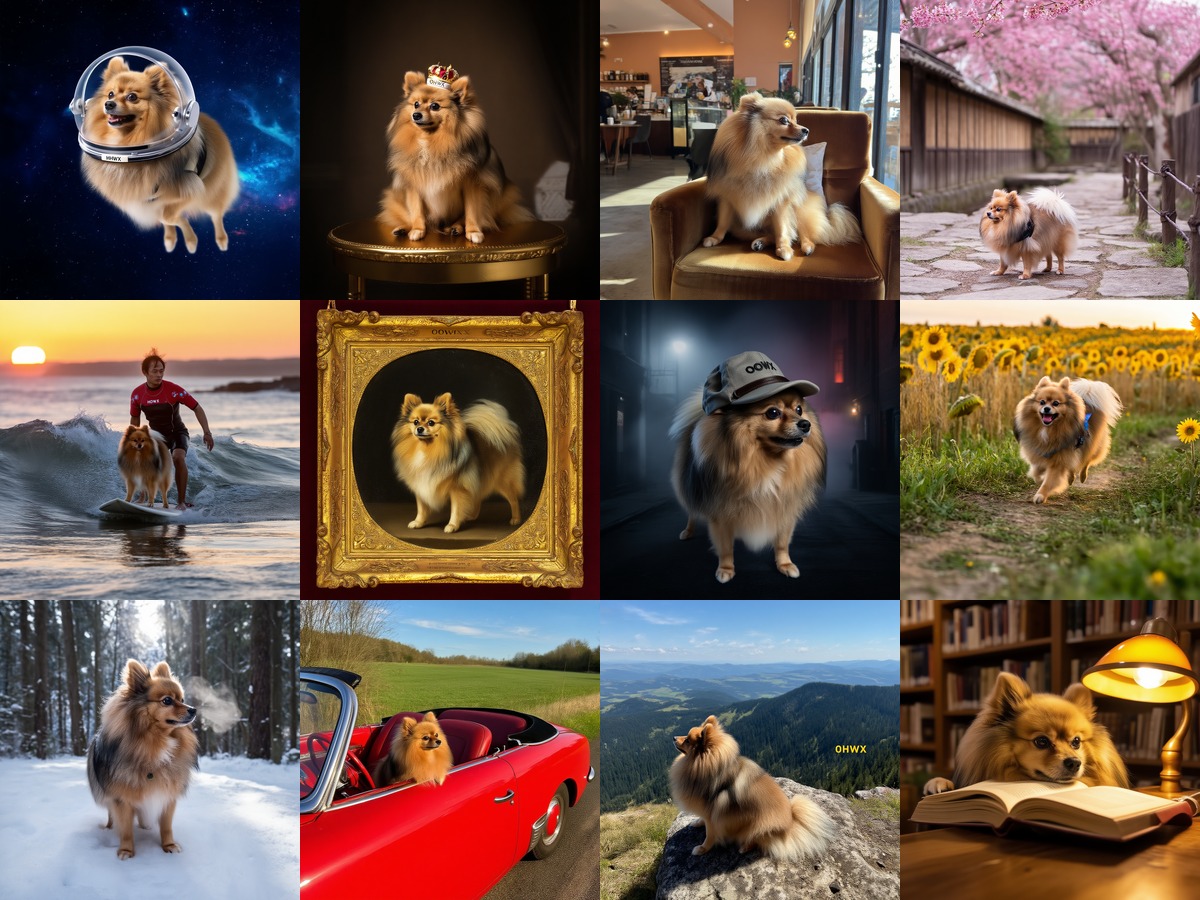
The payoff: 12 scenes generated from a single LoRA trained on 24 phone photos. Space, throne, cherry blossoms, surfing, renaissance, detective, sunflowers, snow, road trip, mountain, library.
The same technique applies to product photography and ecommerce. Train on 20-30 photos of your product and generate it in any setting — lifestyle shots, studio lighting, seasonal campaigns.
Step 1: Prepare your dataset
The dataset is where most character LoRAs succeed or fail. Getting the training settings right matters far less than having good, varied input photos.
Collect images
Aim for 20-30 images. Quality and variety matter more than quantity.
- Angles: front, side, three-quarter, close-up, full body
- Lighting: indoor, outdoor, natural, studio, dramatic
- Backgrounds: varied (not all against the same wall)
- Expressions: smiling, neutral, serious
- Clothing: different outfits (prevents the LoRA from baking in one look)
20 well-varied photos outperform 100 similar selfies. The model needs to see the subject from enough angles and contexts to separate identity from environment.
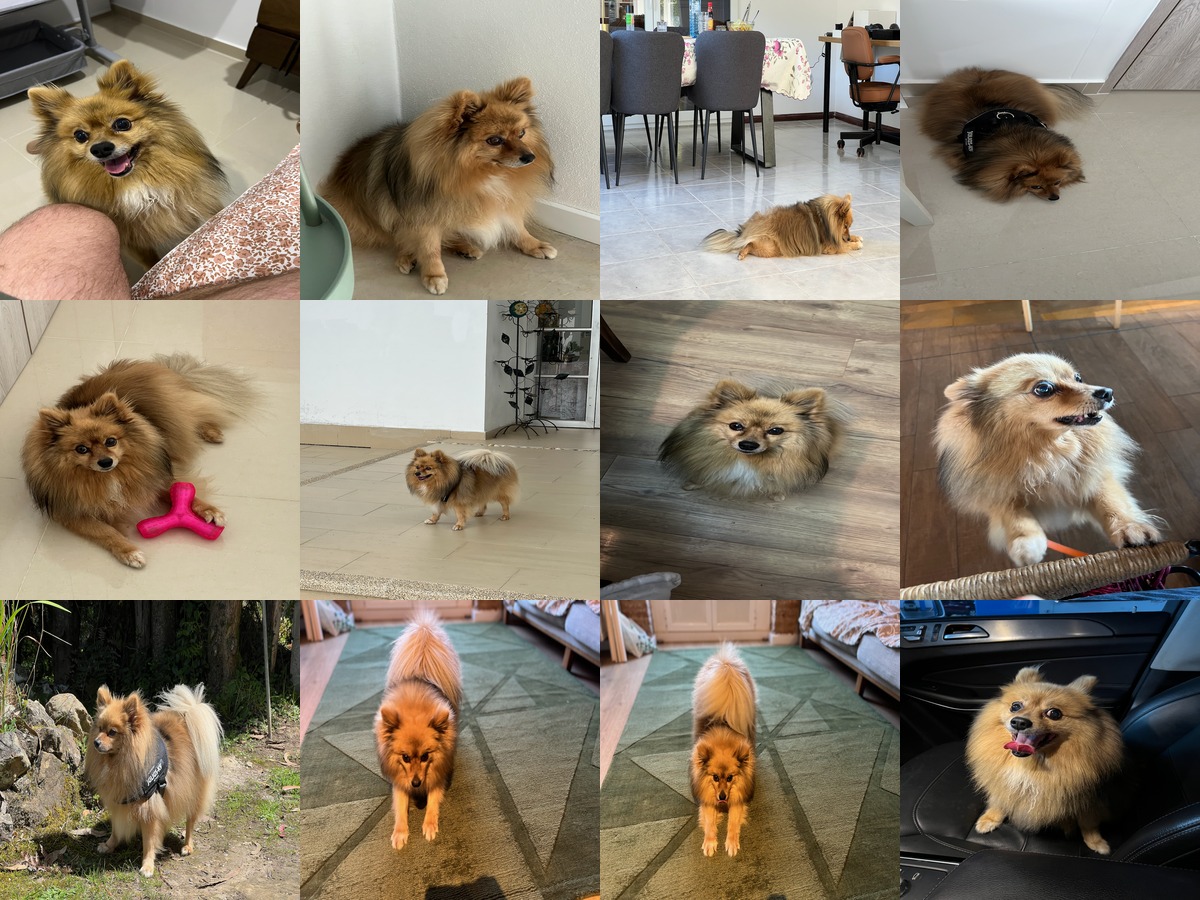
My training dataset (12 of 24 shown). Phone photos with varied poses, indoor/outdoor, different lighting. This is all the model needs.
Create and caption
Why Qwen3-VL? Florence-2 is faster (~1s/image) but hallucinates on people — it invents emotions, scenarios, and backstories. I captioned a person dataset with Florence-2 and got “sentenced to life in prison” on a photo of a TV host. Qwen3-VL produces accurate descriptions and doesn’t fabricate.
Captions should describe everything except the subject’s inherent identity. The model learns identity from the images; captions teach it everything else.
Good: “A fluffy, light-brown Pomeranian sits on a tiled floor, looking up at the camera. Behind it, a pet bed and wooden furniture are visible.”
Too vague: “A cute dog.” — model can’t separate background from subject.
Too long: 200+ words — gets truncated during training, wasting the detail.
Keep captions to 1-2 sentences, 30-50 words.
Don’t add trigger words (like OHWX) to your caption files. The training pipeline injects them automatically. Adding them manually doubles them.
Step 2: Choose your model and rank
I held everything constant across all five runs — same 24 images, same trigger word (OHWX), same class word, same captioning (Qwen3-VL). The only variable was the base model. All benchmarks are from a single RTX 4090.
m4xi rather than OHWX, and it does not appear in the five-model comparison grid below. Its full training time at 2,000 steps was 1 hr 27 min. Treat the quality rating as indicative rather than a like-for-like result — the runs behind it, including the two that failed, are written up in Why Your Character LoRA Doesn’t Look Like Your Subject.
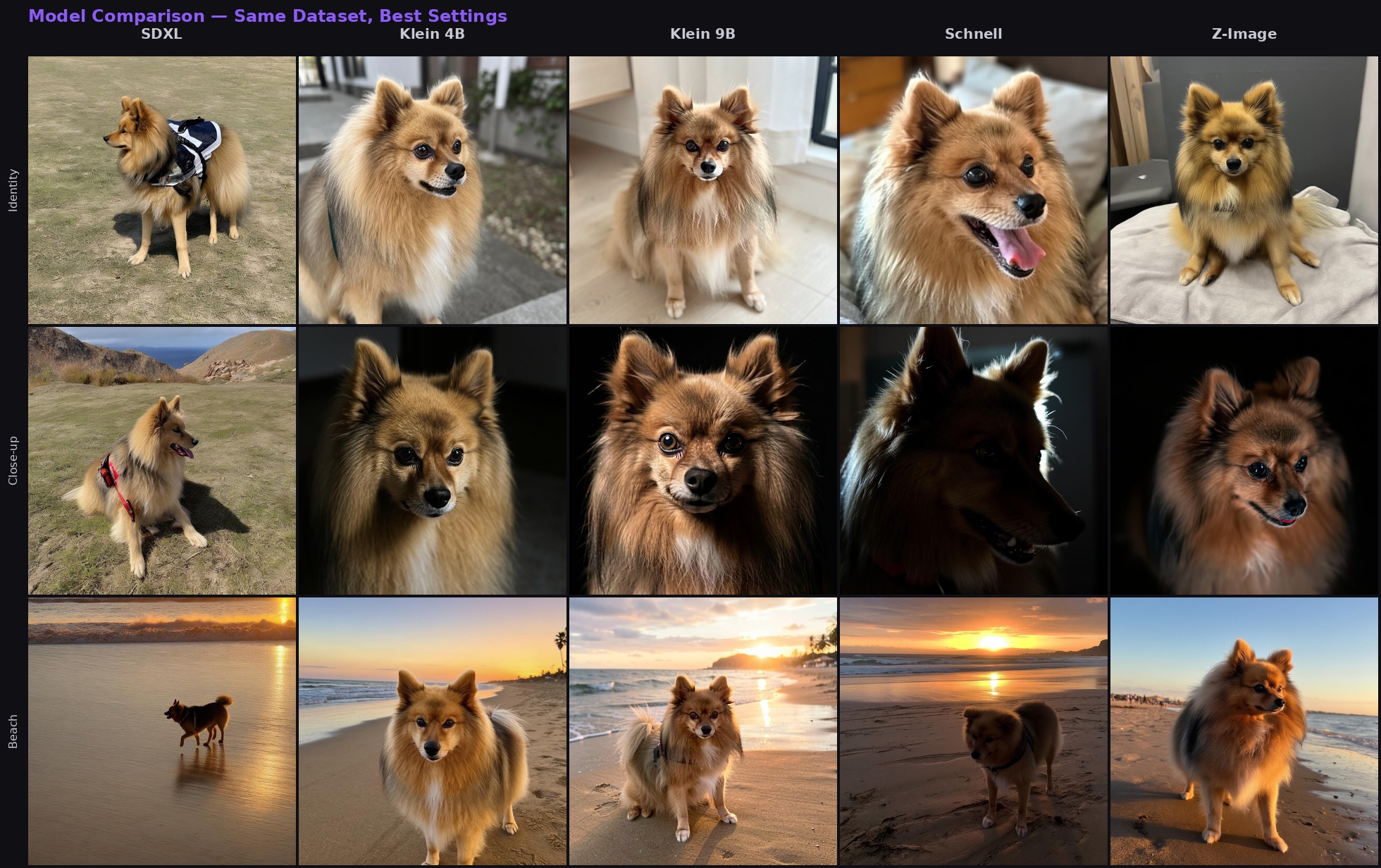
Same 24 photos, same trigger, best checkpoint from each model. Three prompts (identity, close-up, beach) across five models. Z-Image has the best skin/fur realism, Klein 4B the best quality/speed balance.
Choosing rank: 16 vs 32
Rank controls how much the LoRA can learn. This is a training decision, not an inference one — pick before you start.
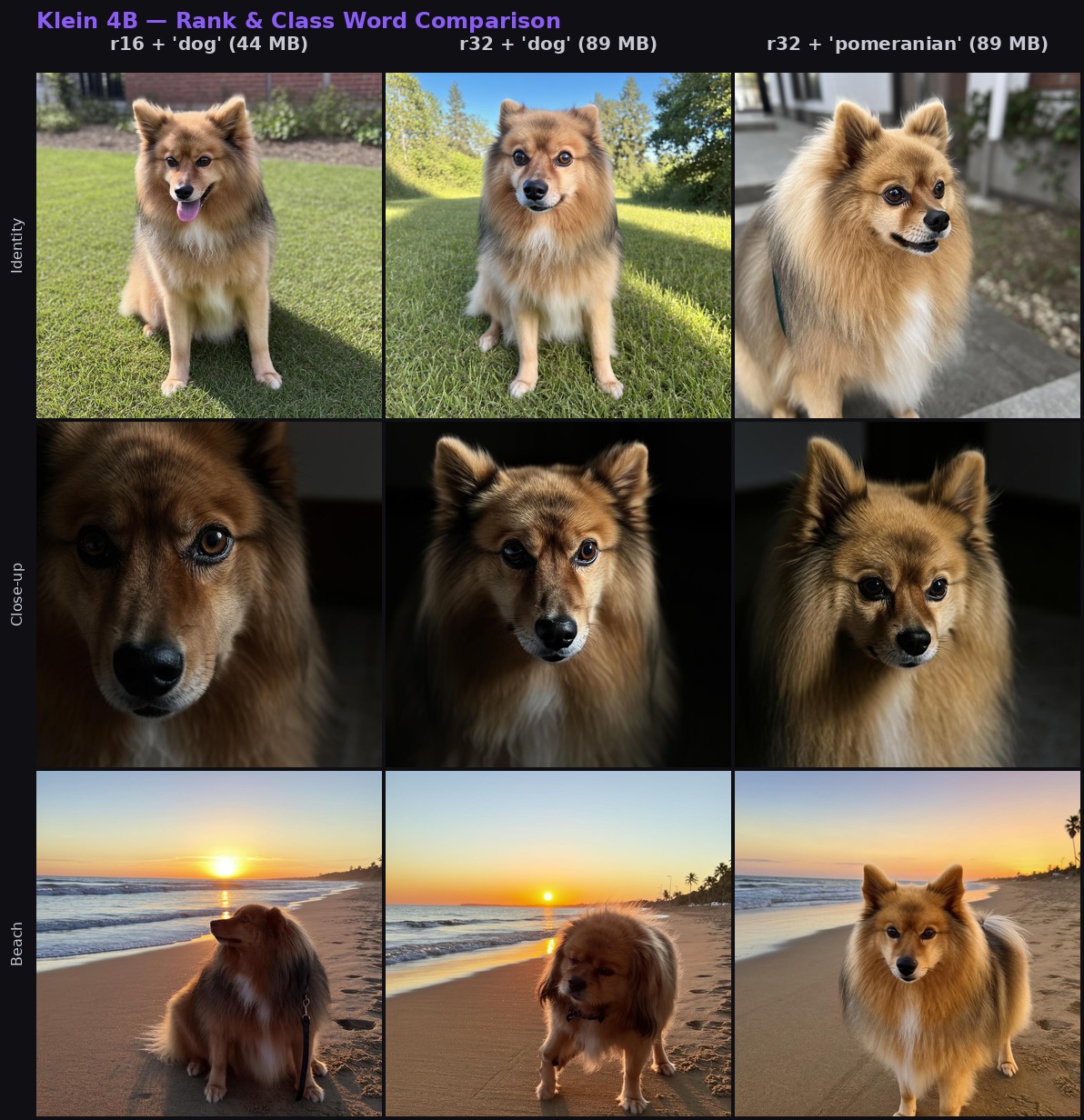
Klein 4B at step 2000, three configurations. Left: rank 16 with 'dog' (44 MB). Middle: rank 32 with 'dog' (89 MB). Right: rank 32 with 'pomeranian' (89 MB). The jump from left to right shows rank and class word working together.
If rank 16 gives you inconsistent likeness, rank 32 is the fix.
Base vs. distilled (Klein)
Klein models come in two variants. This matters because the same --base flag does different things depending on whether you’re training or generating:
modl train --base flux2-klein-4b→ downloads the base (undistilled) variant. Slower inference (~50 steps), but the LoRA learns better.modl generate --base flux2-klein-4b→ uses the distilled variant. Fast (4 steps). LoRAs trained on base transfer to it at strength 1.0-1.5.
modl picks the right variant for each task. If using ai-toolkit directly, make sure you point to the base repo for training — the distilled repo doesn’t include the base transformer weights.
If likeness seems weak during generation with a Klein LoRA, try --lora-strength 1.3. LoRAs trained on base sometimes need a slight strength bump on distilled.
Z-Image: the prodigy discovery
This was the single most important finding from the whole experiment.
Z-Image Base has a known issue with adamw8bit — it often fails to converge for character training. Hundreds of Reddit users spent months and real money failing to train Z-Image character LoRAs. The fix was one setting change: switch to the prodigy optimizer, which auto-tunes the learning rate internally.
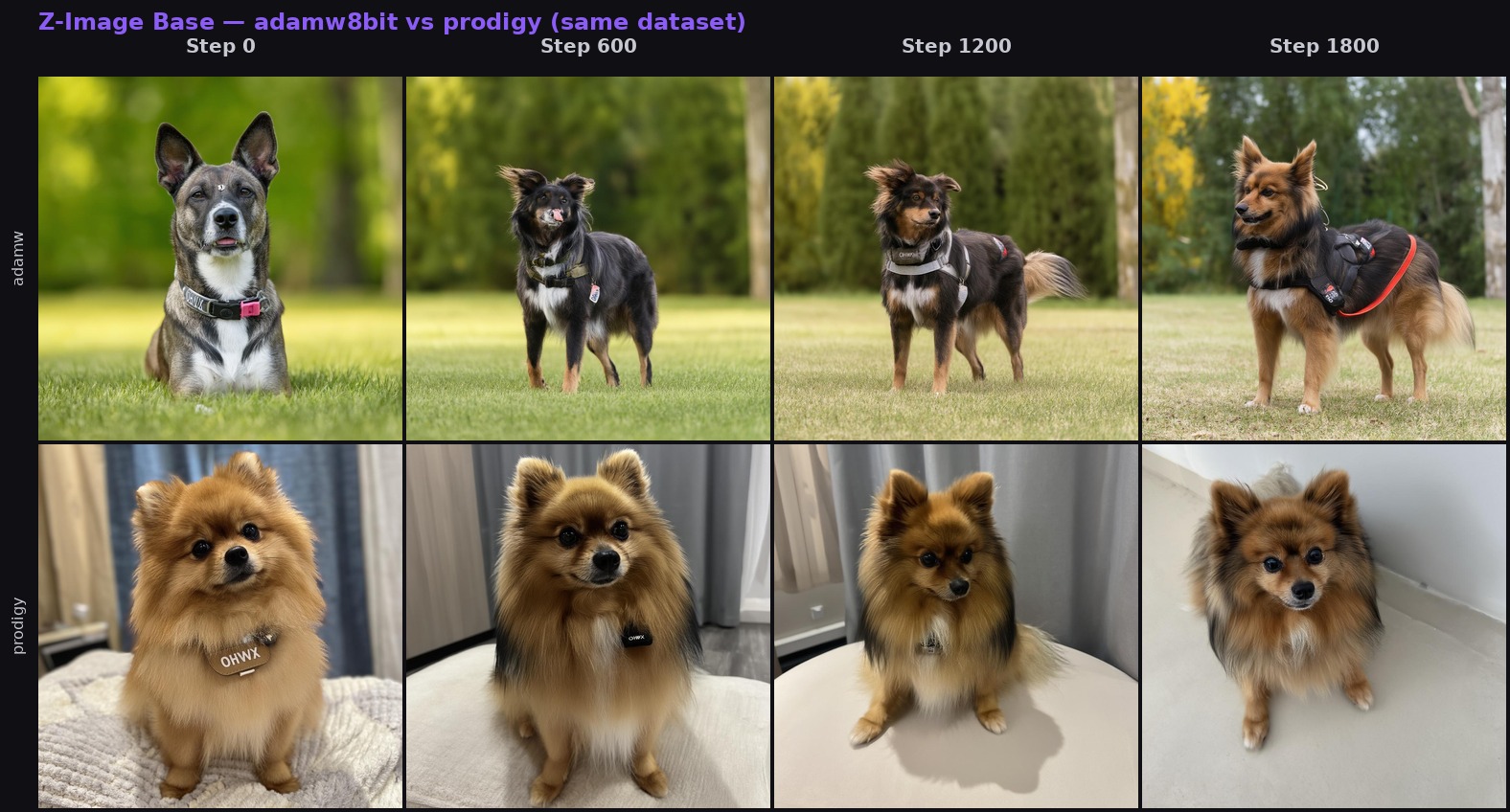
Same dataset, same model, same step count. Top row (adamw8bit): wrong breed at every step — never converges. Bottom row (prodigy): correct breed from step 600, excellent likeness by step 1200. One setting change.
modl now defaults to prodigy for Z-Image Base. Because prodigy converges roughly twice as fast, Z-Image character training peaks around 1500-2000 steps instead of the 3000+ that adamw needed (and usually still failed at).
Step 3: Train
With the dataset ready and model chosen, training is one command. modl selects steps, learning rate, optimizer, and rank based on the model and dataset size.
What the parameters mean
Using “dog” works but can produce the wrong breed or size. Use --class-word pomeranian and the model only needs to learn which Pomeranian — it already knows the breed. This was one of the clearest improvements in my tests.
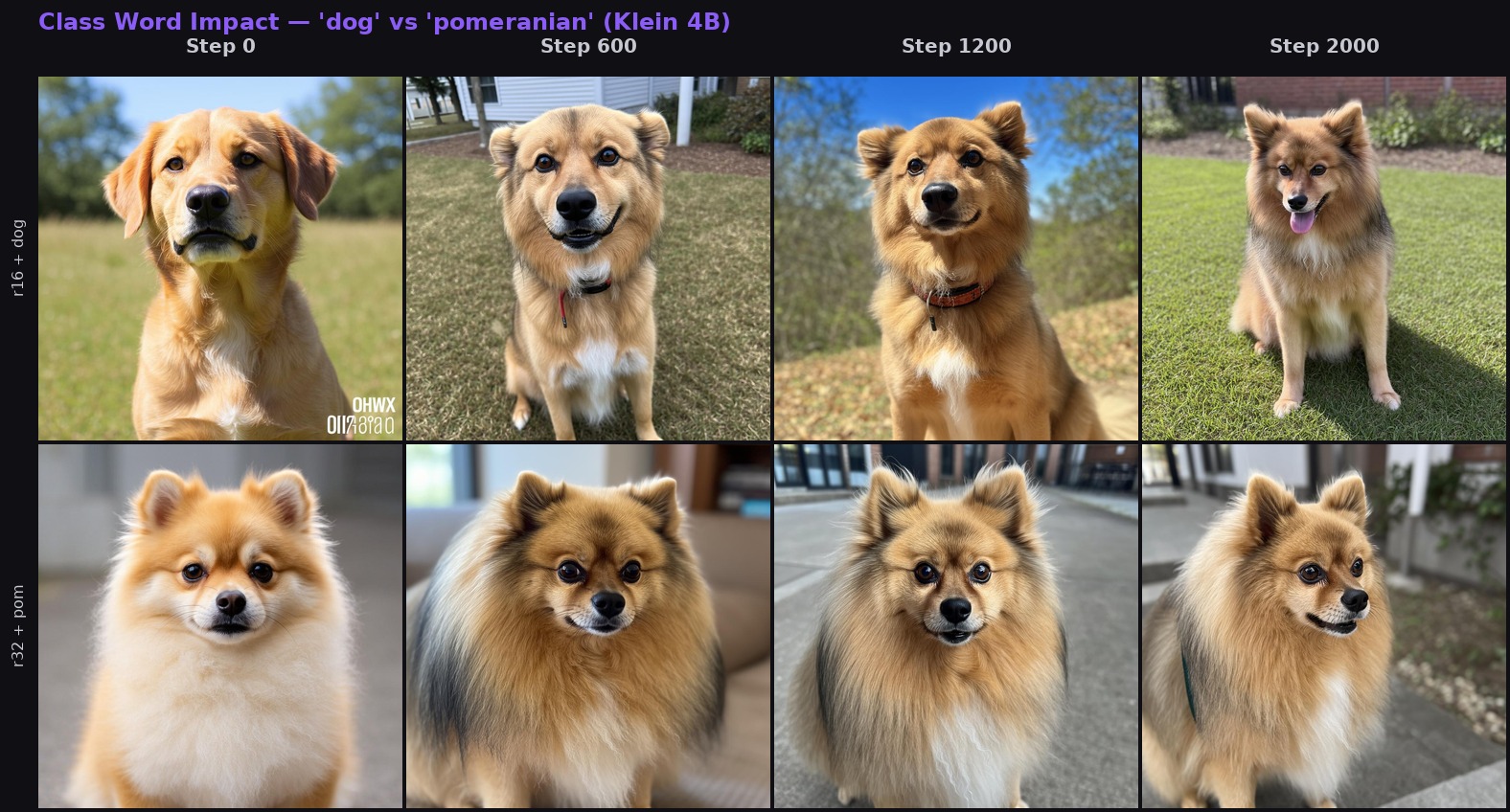
Klein 4B, same dataset. Top: 'dog' — generic, inconsistent size. Bottom: 'pomeranian' — correct breed from step 0. The class word gives the model a head start it never loses.
Step 4: Read your samples
During training, modl generates sample images every ~200 steps using 10 hardcoded test prompts. These test identity, generalization, style diversity, and bleed. They’re the best way to know when training is done — or when something is wrong.
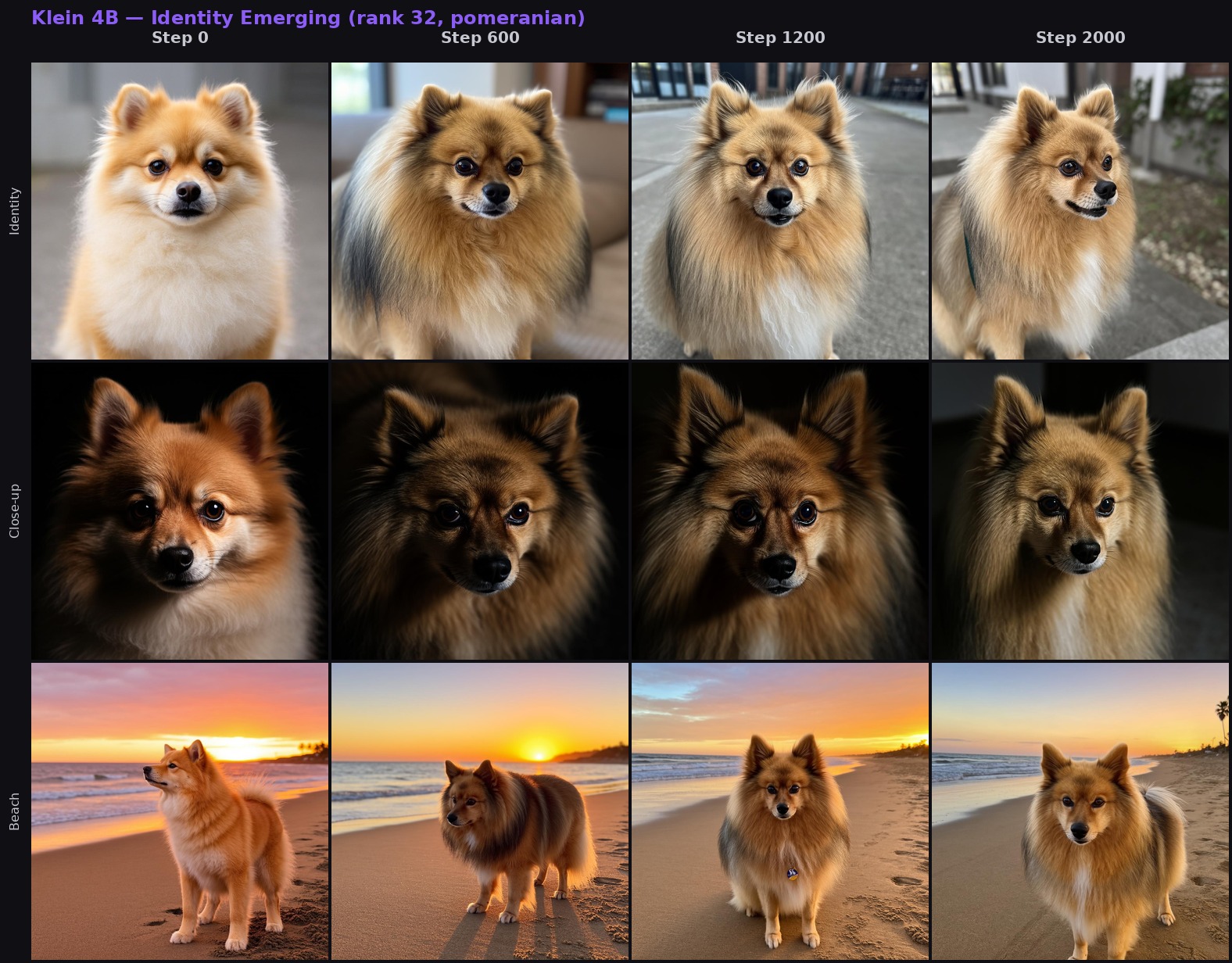
Klein 4B (rank 32, pomeranian): three prompts tracked across 2,000 steps. Identity locks in by step 600, refines through step 2000.
What to look for
Steps 0-500: Vague resemblance starts appearing. If nothing is recognizable, check your dataset.
Steps 500-1500: Identity strengthens. You should recognize the subject in most samples. With prodigy on Z-Image, you may already have excellent results at step 900.
Steps 1500+: For adamw models (Klein, SDXL, Schnell), best results typically land in this range. With prodigy (Z-Image), 1500+ may already be diminishing returns — check earlier checkpoints.
Don’t overtrain
More steps isn’t always better. With prodigy on Z-Image, I got excellent results at step 900. Training to 3000 didn’t damage it — no overfitting — but it didn’t meaningfully improve either. That was 2 extra hours of GPU time for nothing. Your mileage may vary with different datasets, but check your samples as they come in and stop when you’re happy.
modl saves checkpoints every ~200 steps. If step 1200 looks great but step 2000 is overcooked, use the earlier checkpoint. You don’t have to use the final one.
The bleed check
The last two sample prompts don’t include your trigger word:
- “a portrait of a woman smiling”
- “a golden retriever in a garden”
These are hardcoded by modl. When training a dog LoRA, the retriever prompt is the meaningful check — if that retriever starts looking like your dog, the LoRA is bleeding into unrelated prompts. The woman prompt confirms the LoRA isn’t leaking across completely unrelated subjects.
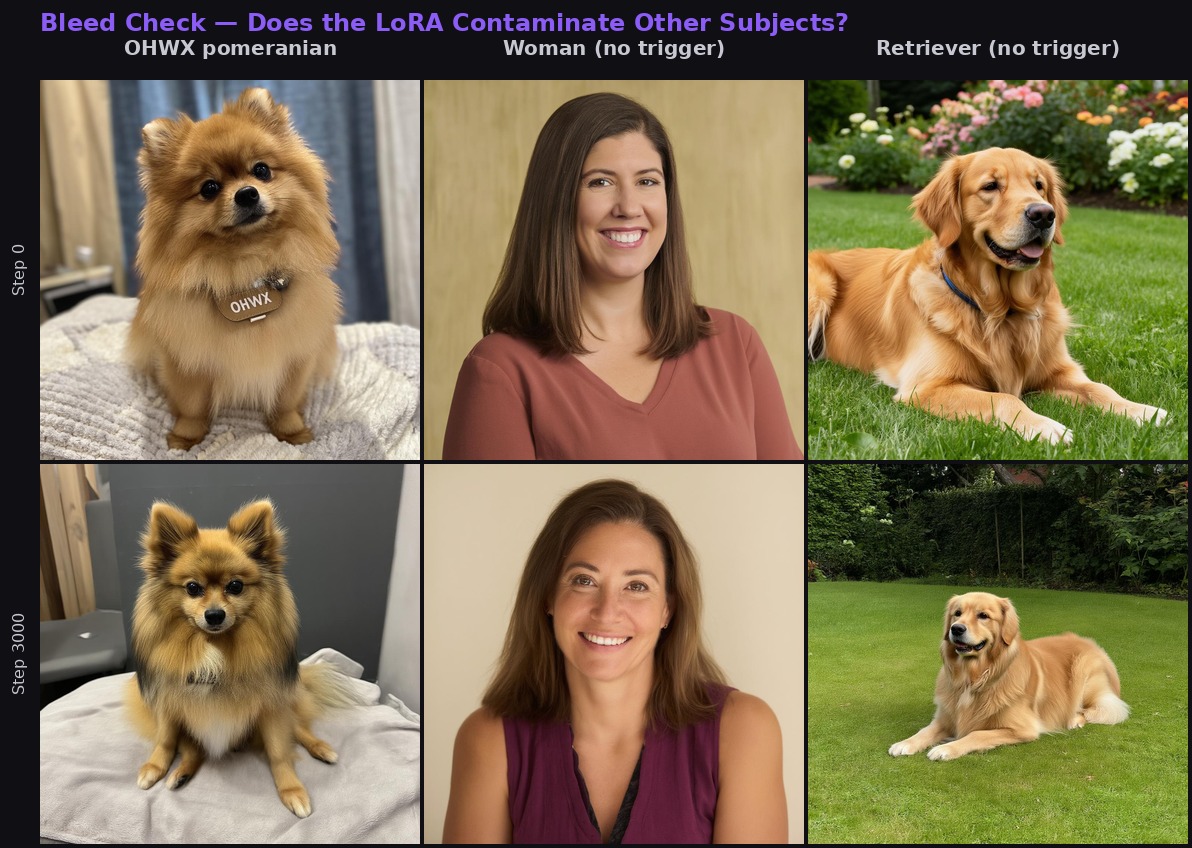
Top: step 0 (untrained). Bottom: step 3000 (fully trained). Left: trigger active — correct identity. Middle and right: no trigger — completely different subjects. Zero bleed after 3000 steps.
Step 5: Use your LoRA
Klein trick: Combine a trained LoRA with a reference image for even better results. Klein supports multi-image reference natively — a weaker LoRA (strength 0.8) plus a good reference photo can beat a strong LoRA alone.
Recommended settings by model
Quick reference
What I learned the hard way
Eight of my runs failed before I got this right. I’m listing these in order of how likely you are to hit them — the first two affect everyone, the rest are edge cases that modl now handles automatically.
Z-Image + adamw8bit = no convergence. This is the big one. I trained Z-Image with adamw8bit and got the wrong breed at every step count. The community spent months on this. Switching to prodigy fixed it immediately — correct identity from step 600. modl now defaults to prodigy for Z-Image Base.
--class-word dog produced the wrong breed. The model sometimes generated a larger dog — it learned the identity but not the body type. Using --class-word pomeranian fixed the proportions immediately. Be as specific as your subject allows.
Florence-2 hallucinated on people. I captioned a person dataset with Florence-2 and got “sentenced to life in prison” and “just won a boxing match” — completely fabricated. Qwen3-VL fixed it instantly. Florence-2 is fine for objects and scenes, not for people.
Stale GPU memory killed 3 runs in a row. I queued Klein 4B → Klein 9B → Z-Image. All three OOMed because a previous modl serve worker was holding 14.7 GB of GPU memory. Fix: check nvidia-smi before training and kill stale processes.
Klein 9B OOMed without quantization. The 9B base model at bf16 plus the Qwen3-8B text encoder exceeds 23 GB — past the 4090’s limit. With quantization enabled: 13 GB, plenty of room, but 2.5x slower (6.1 s/step). Klein 4B is often just as good and much faster.
Klein trained on the wrong HuggingFace repo. Both Klein 4B and 9B crashed with a 404 — ai-toolkit downloaded from the distilled repo instead of the base repo. If using ai-toolkit directly, double-check the repo URL points to the base variant.
Qwen3-8B tokenizer wasn’t cached. Klein 9B crashed because ai-toolkit needed the full tokenizer directory. Make sure config.json, tokenizer.json, etc. are present — not just the safetensors weights.
Resume used the wrong checkpoint. --resume maxi-zimage.safetensors (final file, no step suffix) defaulted to step 0, restarting from scratch. Fix: always use numbered checkpoints like my-lora_000001350.safetensors so the trainer knows where to resume from.
Troubleshooting
Samples look nothing like my subject — Check your dataset. Are the images varied enough? Are captions accurate? Try fewer, higher-quality images (15 good photos > 50 bad ones).
Samples oscillate between overfit and underfit — Increase rank from 16 to 32. More capacity = more stable convergence.
Z-Image doesn’t converge — Make sure prodigy is the optimizer (modl sets this by default). If you manually set --optimizer adamw8bit, switch to prodigy.
Klein LoRA looks distorted — Klein 4B is sensitive to learning rate. modl clamps to 5e-5 automatically. If you overrode --lr, lower it.
“OHWX” appears as text in images — Text-capable models sometimes render the trigger word literally. Cosmetic — doesn’t affect training.
OOM during training — Close other GPU apps. Check nvidia-smi for stale processes. Klein 9B needs quantization on 24GB (modl enables this automatically).
Appendix: what each training parameter actually does
The cheat sheet tells you what to set. This section explains why — so you can make informed decisions when the defaults don’t fit your situation.
Optimizer
The optimizer controls how the model updates its weights at each step. This is the single parameter most likely to make or break your training run.
AdamW 8bit — the default for most models. Tracks per-parameter momentum and variance (how fast and how consistently each weight has been changing), then uses both to scale the update. The “8bit” part compresses the optimizer’s internal state from 32-bit to 8-bit floats, cutting VRAM usage by ~75% with negligible quality loss. You set the learning rate manually — 1e-4 for SDXL/Schnell, 5e-5 for Klein 4B, 1e-4 for Klein 9B. It’s forgiving: a 2x learning rate mistake usually just means slightly worse results, not a failed run.
Prodigy — an adaptive optimizer that auto-tunes its own learning rate during training. You set lr: 1.0 and it figures out the actual step size internally by estimating the distance to the optimal solution. Converges roughly 2x faster than AdamW, which means fewer steps and less GPU time. The downside: it can overshoot and overfit if you train too long — check samples early and stop when they look good. Essential for Z-Image Base, where AdamW consistently fails to converge for character training.
AdamW 8bit when modl’s default LR works for your model and you want predictable, stable training. Prodigy when you want faster convergence, when AdamW isn’t converging (Z-Image), or when you’d rather not tune the learning rate manually. If in doubt, use whatever modl defaults to for your model — it’s been tested.
Learning rate
How big a step the optimizer takes at each iteration. Too high and the model overshoots — weights bounce around and never settle. Too low and training crawls or stalls.
The right value depends entirely on the optimizer:
- AdamW 8bit: you set it manually. Each model has a tested default (Klein 4B:
5e-5, Klein 9B:1e-4, SDXL:1e-4, Schnell:4e-4). Klein 4B is especially sensitive — anything above5e-5can produce distorted outputs. - Prodigy: set to
1.0and leave it alone. The optimizer handles the actual scaling internally. Setting it lower (like0.1) just tells Prodigy to be more conservative, which slows convergence.
If your samples look noisy or unstable across steps, your LR is probably too high. If nothing is changing after 500+ steps, it’s too low.
Steps
Total number of training iterations. Each step processes one batch of images and updates the weights once.
The right step count depends on dataset size, model, and optimizer:
- More images → more steps. A 24-image dataset needs ~2000 steps on Klein 4B. A 12-image dataset might peak at 1200.
- Prodigy converges faster. Z-Image with prodigy peaks around 1500 steps. The same model with AdamW might need 3000+ (and still fail).
- More steps ≠ better. Training past the sweet spot doesn’t always overfit, but it wastes GPU time. Check your samples as they come in — if step 1200 looks great, you can stop there.
modl auto-calculates steps based on model and dataset size. Override with --steps if you know better.
Rank
How many parameters the LoRA adds to the base model. Higher rank = more capacity to learn detail, but larger file size and slightly slower training.
- Rank 16 (~44 MB for Klein 4B): good for simple subjects, first attempts, small datasets.
- Rank 32 (~88 MB for Klein 4B): better for complex subjects (detailed tattoos, intricate fur patterns, products with fine text). More stable convergence — if rank 16 oscillates between overfit and underfit, rank 32 usually fixes it.
This is a training-time decision. Once trained, rank doesn’t affect inference speed.
Batch size
How many images the optimizer sees before updating weights. For LoRA training, leave it at 1. Increasing batch size requires proportionally scaling the learning rate (2x batch = 2x LR), adds VRAM usage, and rarely improves LoRA quality. The only reason to increase it is if you have a very large dataset (100+ images) and want to speed up training on a multi-GPU setup.
EMA (Exponential Moving Average)
Keeps a running average of the model weights alongside the actively training weights. The idea is to smooth out noise in training. In practice, EMA adds ~30% training time and VRAM for LoRAs with minimal quality improvement — the LoRA’s low rank already acts as a regularizer. Leave it off.
Cheat sheet
Everything above, compressed into one card. Pin it or screenshot it.
Open full-size version for sharing →7 GB · 28 min
15 GB · 85 min
13 GB qnt · 3.3h
20 GB · 64 min
17 GB · 2 hrs
What’s next
The biggest surprise was the prodigy optimizer. One setting change turned Z-Image from “doesn’t work for characters” into the best realism I’ve tested. The class word specificity was the second — “pomeranian” vs “dog” is a free quality boost that costs nothing.
Things I’d explore next: LoKr instead of LoRA (community reports even better character capture on Z-Image), training at 512px resolution first then multi-res (some users swear by it), and pushing these LoRAs to the hub for cloud inference.
If you train a character LoRA and find something these benchmarks missed — a better optimizer setting, a model that surprised you, a failure mode I didn’t hit — I’d like to hear about it. Open an issue at github.com/modl-org/modl or share your results on Reddit.
Once you have a LoRA you’re happy with,modl push lora my-character-v1 --name my-character uploads it to the hub. For style training, see the Style LoRA guide.